

How to Run a Link Building Campaign: 6 Stages, Measured

by Rachid Idali
Last Updated: October 17, 2026
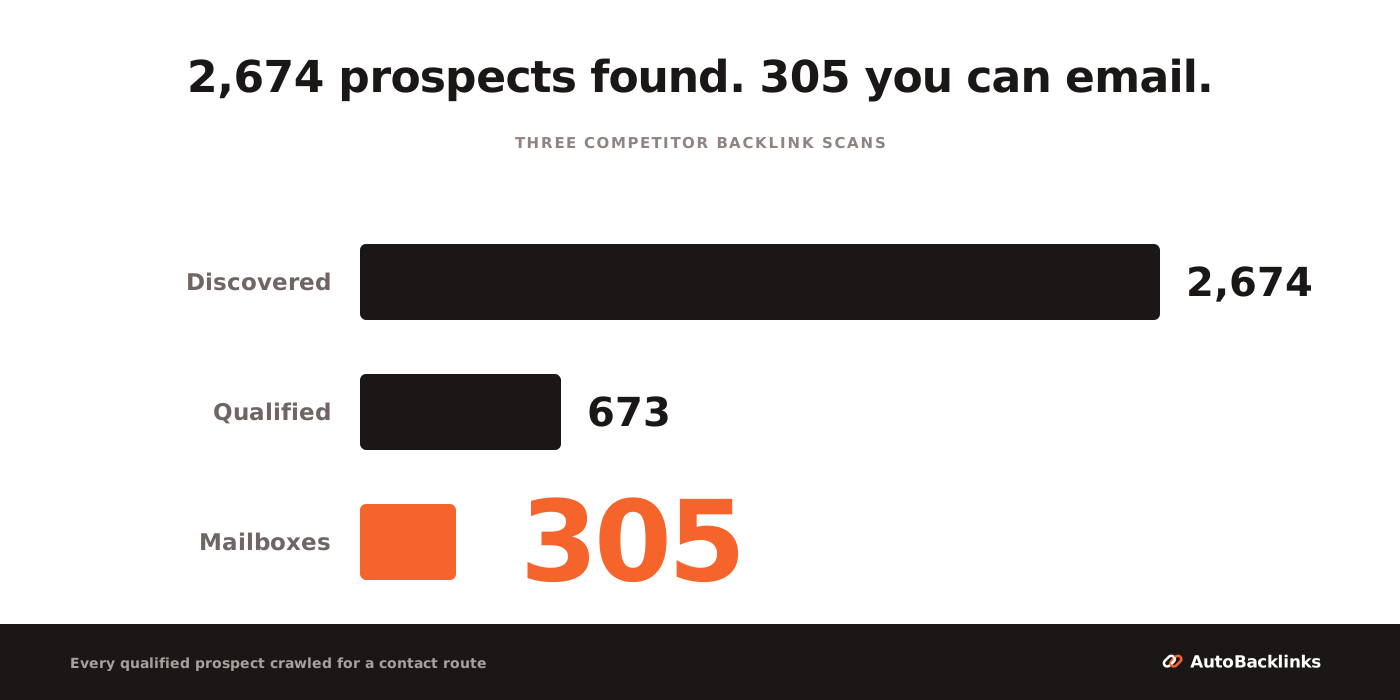
A link building campaign runs in six stages: pick the target page, discover prospects, qualify them on relevance, find a contact, send the outreach, handle the replies. The part nobody publishes is how much the list shrinks on the way, so I measured it: 2,674 discovered domains became 673 qualified prospects, and those produced just 305 mailboxes anyone could actually send to, 11% of where the campaign started.
That 11% is the number you plan a campaign around. Every guide on this topic gives you the steps. None of them tells you how many prospects to start with, which is the only question that decides whether your campaign produces ten conversations or none.
The six stages, in order:
- Pick the target page and set the number of referring domains you want.
- Discover prospects, mostly from competitor backlinks.
- Qualify them on relevance, then on metrics.
- Find and verify a contact for each survivor.
- Write and send the outreach, with one or two follow-ups.
- Handle replies and report links live after 30 days.
Here is how I got the numbers. I took three real competitors in one niche, pulled their referring domains, ran the whole pool through the filters a campaign actually applies, then crawled every survivor to see whether a contact route existed at all. Each stage below carries what it removed.
What a link building campaign is
A link building campaign is a time-bound push to earn links to specific pages, run as a sequence of stages with a start, a prospect list, and a finish.
That is different from link building as an ongoing habit. A campaign has a target page, a fixed list, a sending window, and a number at the end. Ongoing link building is what you do between campaigns.
The unit matters. One site that links to you is a referring domain, however many times it links. Count backlinks instead and a single site-wide footer link will flatter your campaign by a few hundred. If the attributes behind those links are new to you, what backlinks are and which ones count covers the ground this article assumes.
One more distinction worth making early, because it changes what you count at the end. A link that carries rel="nofollow" or rel="sponsored" still sends readers and still puts your name in front of an audience, but it does not pass ranking credit. Outreach campaigns earn a mix of both, and a campaign report that counts only dofollow links will read worse than the campaign was, while one that counts everything will read better.
How many prospects a link building campaign needs
This is the sizing question, and it has a measurable answer.
I pulled the referring domains of three competitors in project management software (teamwork.com, hive.com and plutio.com), asking for the thousand highest-authority domains from each with a backlink spam score under 30. Teamwork and Hive returned a full thousand, Plutio has only 925 that qualify, so 2,925 rows. Deduplicated, that is 2,674 unique domains: a realistic starting pool for one campaign.
Three things about that sample before you lean on it. It is three competitors in one niche and one scan, so the exact percentages will move for yours. The authority threshold below uses DataForSEO's domain rank, which runs 0 to 1,000 and is not the same scale as Ahrefs' 0 to 100 Domain Rating. And the contact stage was crawled by script, so it measures what a site publishes where a machine can find it, which is a floor rather than a ceiling: a human with ten minutes and a LinkedIn tab will beat it on any given site. What travels is the shape, not the decimals.
Then the filters, in the order a campaign applies them:
| Stage | What it removes | Left |
|---|---|---|
| Discovered | nothing yet | 2,674 |
| Not a platform | social networks, code hosts, app stores, government sites, anything with no editorial owner to email | 2,653 |
| Has authority | domains below a domain rank of 50, on DataForSEO's 0 to 1,000 scale | 827 |
| Has an editorial surface | sites linking from a single page, which are usually a stub or a directory entry | 673 |
| Has a contact | crawled, site by site, for a usable address | 305 |
Three quarters of the pool is gone before anyone writes an email, and more than half of what survives will not give you an email address. 673 of 2,674 clear qualification, which is 25.2%. Of those, 311 publish an address, and because some sites share a mailbox those 311 are only 305 distinct inboxes. End to end, 11.4% of what you discover becomes an email you can send.
Turn that around and it becomes a planning rule. To send 100 first-touch emails you need to discover about 877 domains. Want 300 sends? Start near 2,600.
Now attach replies. Backlinko, with data from Pitchbox, analyzed 12 million outreach emails in a 2019 study and found that only 8.5% receive a response. Our own campaign, documented in full, ran at 17.1%.
At those two rates, 305 sends is 26 replies at the broad baseline and 52 at ours. That spread is the whole argument for spending your effort on the list rather than the subject line.
Stage 1: pick the target page and set the link goal
Start with the page, not the list. A campaign aimed at your homepage gives an editor nothing specific to link to, which is why those campaigns stall.
Pick one page that deserves links and could rank higher: a guide, a tool, a piece of original data. Then size the gap against what already ranks, because how many backlinks you actually need is measurable rather than a matter of taste.
Write down three things before you go further: the page, the number of referring domains you want, and the date you stop sending. The date is what makes it a campaign.
The goal number is where most plans go soft. Pick it by looking at what the pages currently ranking for your term actually have, not by picking a round figure that sounds ambitious. If the top results sit on 40 to 60 referring domains and you have 12, the gap is the target, and it is a smaller number than most people expect.
This is also the moment to decide what counts as a win. Links live after 30 days is the honest unit. Replies, agreements and "we will add it next week" are all upstream of that.
Stage 2: find link building prospects
There are four sources worth your time, and they are not equal.
- Competitor backlinks. Every site already linking to a rival has shown it will link to something in your category. This is the highest-yield source and the one I start with. How to find competitor backlinks covers which of them you can realistically copy.
- Listicles and resource pages that already cover your category and are missing you.
- Guest post targets: sites in your niche that publish contributed articles.
- Link insertion targets: existing articles where your page is a genuinely useful addition, which link insertions and niche edits walks through.
Aim for coverage at this stage, not quality. The 2,674 domains above came from three competitor profiles and nothing else, and that single source was enough to fill a campaign.
How many competitors to scan has a measurable answer, and it surprised me. Across those three profiles, 92% of the domains link to exactly one of the three, and only 36 link to all three. So the second and third scans are not mopping up overlap, they are almost pure new inventory: the first competitor returned 1,000 domains, the second added 863 the first did not have, and the third added 811.
The practical rule is scan more competitors than feels necessary. Two is not meaningfully safer than one, and the fourth and fifth are still buying you most of a scan's worth of new names.
Quality is the next stage's job, and trying to do both at once is how people end up with a list of 40 prospects and a month of work. If you want to compare what the category offers, I scored the link prospecting tools on what they actually return.
Stage 3: qualify link prospects on relevance before metrics
Relevance first, metrics second. This order is the single biggest lever in the whole campaign, and most people run it backwards.
A high-authority site with no reason to mention you is worth less than a mid-authority one whose readers are your buyers. Sort by authority first and you will spend your contact budget on sites that were never going to say yes.
The metrics still matter, they just come second. Once relevance has ordered the list, the useful filters are organic traffic (a site with authority and no traffic is usually coasting on an old profile), referring domains, and a spam score to catch the obvious networks.
In the measured pool, the mechanical filters alone cut 2,653 domains to 827 on authority and then to 673 on whether the site had more than one page linking out. That second filter matters more than it sounds: a site that links from exactly one page is usually a directory entry or an abandoned stub, not a publisher.
What the filters cannot do is read a page. Whether a site genuinely fits your topic, and which specific page on it should carry your link, is a judgment call, and it is the one you should spend your own time on. The rest of how to get backlinks sets out which methods are worth qualifying for in the first place.
Stage 4: find a contact for every link prospect
This is the stage every guide skips with "then find their email", and it is where the list collapses.
I crawled all 673 qualified prospects, reading each homepage and, where that gave nothing, up to three more pages looking for an address. Every site that refused the first pass was re-checked through a real browser, because a 403 against a script is a bot block and not a dead website. That re-check mattered: 101 sites refused the crawler, and 60 of them turned out to be perfectly alive.
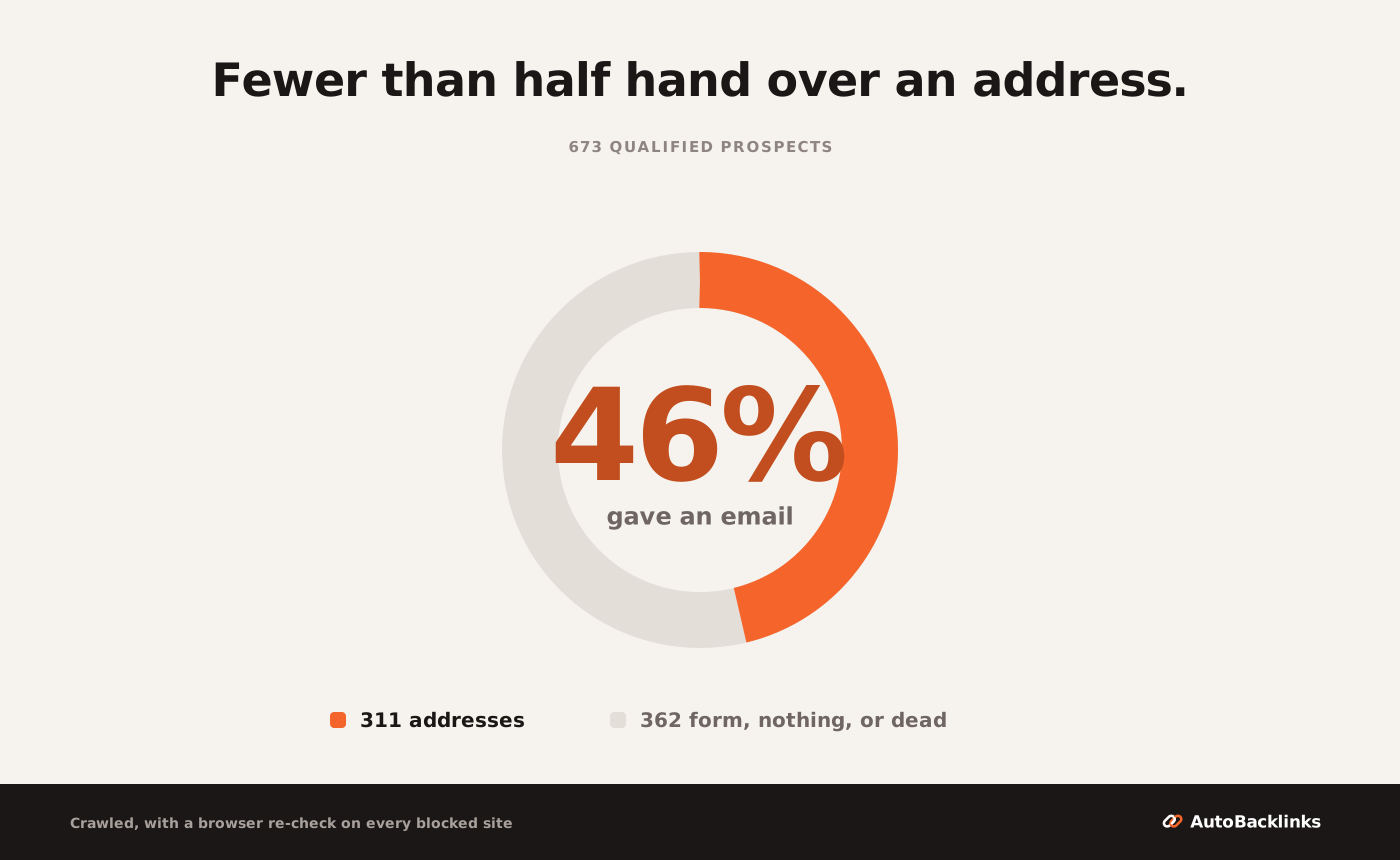
The split across those 673 sites:
- 311 (46.2%) published a usable email address.
- 196 (29.1%) offered a contact form and no address.
- 100 (14.9%) showed no contact route at all.
- 41 (6.1%) did not load, even in a real browser.
- 25 (3.7%) published something that looks like an address and is not.
Three details change how you should work this stage.
That last bucket is the one to dwell on. It holds template dummies the site shipped and never replaced (you@company.com, name@company.com, your.email@property.com), plus machine artifacts a crawler cannot tell from a mailbox: an error-tracking key, a Cloudflare obfuscation hash, two blockchain payment strings. That is what a scraper hands you without comment, and it is why a bought list always contains some number of addresses that were never real.
Second, 311 addresses are not 311 sends. Strip the duplicates and they are 305 distinct mailboxes, because several prospect sites share one inbox. One address, sales@teamwork.com, turned up from three different prospect domains, which is also a reminder that competitors show up in each other's referring-domain sets. Your sending unit is the mailbox, not the prospect row.
Third, 210 of those 305 mailboxes, 68.9%, are a role inbox rather than a person: info@, contact@, hello@, support@, sales@, admin@, press@ and the rest of that family. Only 95 are addressed to someone in particular.
I would not claim a role inbox replies worse than a named editor, because I have not measured that and I have not found anyone who has. What is measured is adjacent and still useful: Backlinko's 2019 analysis of 12 million outreach emails found that reaching several contacts at an organization produced a 93% higher response rate than reaching one. That argues for adding a named person alongside the role inbox, not for replacing it.
Do not write off the 196 form-only prospects either, because 29.1% of a qualified pool is too much to discard. Forms work, they just do not sequence: you cannot follow up, you cannot tell whether anyone read it, and the submission usually lands in the same shared inbox. Work them as a separate manual batch after the email campaign is sent, highest relevance first, and expect to spend a few minutes each.
Stage 5: write and send the link building outreach emails
Now you have a list you can send to. Three things decide what it returns.
Write each email around the prospect's own page. Not the domain, the page: the article an editor maintains and could add your link to. "I loved your article" is detectable in a second, and editors read dozens of these a week. The annotated examples in guest post pitch examples show the difference in wording.
Follow up, once or twice. Backlinko's 2019 study found a single follow-up lifted replies by 65.8%, and sequences that combined several attempts with several contacts by 160%. Most of the replies I have had over ten years of running these campaigns came from the second email, not the first.
Send slowly from a warmed inbox. Volume is not the lever here, and sending 300 cold emails in an afternoon from a fresh domain costs you deliverability for every campaign after this one.
The honest framing of the result: our 187-email campaign came in at a 17.1% reply rate, about double the broad baseline. I think the list is why, because that is where the work went. I have not run the control that would prove it, and the two numbers are not strictly comparable anyway: ours was one campaign in the education niche, the 8.5% is a cross-industry average from 2019.
Stage 6: handle replies and report the link building campaign
When someone replies, stop automating. This is a conversation with a person who has limited time and no obligation to help you.
Count the right things. A campaign report that lists emails sent is a report about your own activity, not about links. Count sends, replies, positive replies, and links live after 30 days.
One point about honesty in reporting, including to yourself. Our published campaign reports 187 sent, 155 opened, 32 replied and 6 bounced. It reports replies, not placements, and that distinction is worth keeping in your own reporting too, because a reply is not a link.
Expect the links to trail the sending by weeks. An editor who says yes in week two may publish in week six, so a campaign closed and measured on the day you stop sending will always read worse than it was.
What a link building campaign costs in credits and hours
In hours, the contact stage is the expensive one. I crawled those 673 sites rather than visiting them, so I cannot hand you a measured human time. But the work is well understood: open the site, look for a contact page, copy the address, move on. At two minutes a site, which is brisk, 673 of them is 22.4 hours. Take that as arithmetic on an assumption, not a stopwatch reading, and note it runs before anyone writes a single email.
In credits, the thing to understand is which pool each action is charged on. Discovery and metrics are charged on the whole pool, contact lookup only on prospects that passed qualification, and drafting only on the ones you actually send to. That is why the cost does not scale with the 305 emails you end up sending.
| Action | Price | Charged on | This campaign |
|---|---|---|---|
| Competitor backlink scan | 5 credits per scan, plus 10 per 100 new backlinks, capped at 105 | each competitor | 3 scans, up to 315 |
| SEO metrics | 1 credit per 2 domains | the pool you filter | 2,653 domains, 1,327 |
| Verified email | 3 credits | prospects past qualification | 673, so 2,019 |
| Outreach email | 1 credit per email in the sequence | mailboxes you send to | 305 first touches plus one follow-up each, 610 |
| about 4,300 |
Metrics and contact lookup are 78% of that bill, and both are charged on prospects you will never email. 1,327 plus 2,019 is 3,346 of roughly 4,300 credits, spent largely on the 2,369 domains that never reach a send.
That has a practical consequence. Narrow the pool on the signals that cost nothing first, the obvious platforms and the one-page stubs, before you spend a credit on metrics for a domain you were never going to pitch.
At that size the campaign does not fit a Starter month. Starter is 2,500 credits at $49 a month on the current launch price, against a $79 list price. 4,300 credits means Growth at $179 for 7,500, or splitting the campaign across two months. The full plan breakdown has the rest.
A worked link building campaign, end to end
Putting the numbers together for one reader. Say you run a B2B SaaS site, you want 10 new referring domains to one guide, and your reply-to-link rate is one link for every four positive replies.
- Target. One guide. Competing pages sit on 40 to 60 referring domains, you have 12, so 10 is a real target rather than a round number.
- Work backwards. 10 links at one in four replies is 40 replies. At the 8.5% baseline that is 470 sends; at a tightly relevant list closer to our 17.1%, about 234.
- Size the pool. Take the harder number. 470 sends at 11.4% end-to-end survival means discovering about 4,100 domains, which is four or five competitor profiles rather than one.
- Qualify. Roughly 1,040 clear relevance and metrics.
- Contact. Roughly 470 give you a mailbox, and about 320 of those are a role inbox where a named person is worth hunting for.
- Send and report. Send over three to five weeks with one or two follow-ups, then count links live at 30 days after the last send.
The step people skip is 3. Starting from one competitor and 600 domains, the same funnel produces about 68 sends and six replies, and no amount of rewriting the email fixes that.
Link building campaign mistakes that cost you the result
The five I see most, in the order they do damage.
- Starting from a pool that is too small. Everything downstream is a percentage of it, so a thin pool caps the campaign before the first email.
- Sorting by authority before relevance. This spends the contact budget, which is the expensive one, on sites that were never going to say yes.
- Running metrics on the whole raw list. Platforms and one-page stubs cost nothing to remove on name alone, and paying to measure them is the most common way to waste half a month of credits.
- Pitching the role inbox and stopping there. Seven in ten recovered mailboxes are an info@ or a sales@, and adding a named person alongside it is the move the data supports.
- Counting replies as results. A friendly reply is not a link. Report links live at 30 days, or the campaign will look better than it was.
What Google's link spam policy says about campaigns
Google's spam policies define the offence narrowly:
Link spam is the practice of creating links to or from a site primarily for the purpose of manipulating search rankings.
The policy names eleven kinds of link spam, including paid links that pass ranking credit, excessive link exchanges, automated link generation, and links in low-quality directories. Read the advertorial bullet carefully, because it is narrower than it is usually quoted: optimized anchor text in guest posts and press releases appears inside the clause about placements where payment is received, not as a standalone offence.
On buying links, the wording is more specific than either side of the argument usually admits:
Google does understand that buying and selling links is a normal part of the economy of the web for advertising and sponsorship purposes.
The clause that matters is "for advertising and sponsorship purposes", and the condition is that such links carry rel="nofollow" or rel="sponsored". Paying for a link that passes ranking credit is the violation.
What the policy does not contain is a rate limit. There is no monthly ceiling, no links-per-day figure, and no velocity threshold anywhere in it. Outreach is not mentioned at all, because asking a publisher to consider your page is not the thing being policed.
How to run a link building campaign in AutoBacklinks
The six stages above are the method whether you run them by hand, across four tools, or in one place. AutoBacklinks is our own product, so treat what follows as a spec sheet rather than a review.
Discovery and qualification: add your site and keywords, or point a competitor backlink scan at a rival, and the pool comes back scored for topical relevance alongside the SEO metrics. That is stages 2 and 3, and it is where the 2,674 to 673 collapse happens without you watching it.
Contacts, drafts and sending: the outreach agent runs contact lookup on the survivors only, drafts a first email and follow-ups from each prospect's own page, and sends on a schedule. That is stage 4 and 5, and it is the 22.4 hours.
What stays yours: the target page, the final read on which sites deserve a link, every email before it sends, and the replies. Every credit spend waits for your approval first, and the same steps run from Claude, ChatGPT or Cursor through the MCP server if you would rather work from chat.
What it does not do, because the anti-claims matter as much as the claims. It does not write the guest post or the linkable asset, only the outreach around it. It does not sell, broker or place links, so there is no inventory to buy. It does not replace Ahrefs or Semrush for rank tracking and site audits; it consumes SEO metrics to filter prospects rather than reporting on your own site. And it will not rescue a campaign aimed at a page nobody has a reason to link to.
There is a 7-day trial with 120 credits and a card on file, which is enough to run a small campaign end to end before you decide. You can start there.
FAQ
What is a link building campaign?
A link building campaign is a time-bound push to earn backlinks to one specific page, run as six stages: pick the target page, discover prospects, qualify them on relevance, find and verify a contact, send the outreach, then handle the replies. The thing that makes it a campaign rather than an ongoing habit is that it has a fixed list, a sending window and a number at the end.
How many prospects do you need for a link building campaign?
About nine discovered domains for every email you can send. I carried 2,674 discovered domains through every qualification stage and 305 distinct mailboxes came out the other side, which is 11.4%. To send 100 first-touch emails, plan on discovering around 877 domains.
How long does a link building campaign take?
Plan on weeks rather than days. The sending window itself runs three to five weeks once follow-ups are spaced properly, and the links trail the sending, because an editor who agrees in week two may not publish until week six. Measuring links live at 30 days after the last send gives a truer number than closing the campaign the day you stop emailing.
What is a good reply rate for a link building campaign?
A 2019 Backlinko study of 12 million outreach emails found that 8.5% receive a response, which is the broad baseline. Our own campaign ran at 17.1%, and the lever was the prospect list rather than the email copy. If your reply rate is low, audit relevance before you rewrite the subject line.
Do you need a tool to run a link building campaign?
No, but the contact stage will cost you about 22.4 hours for a 673-prospect list if you work it by hand at two minutes a site. Tools are worth it for the clerical stages: discovery, metric filtering, contact lookup and sequencing. The judgment calls, which sites deserve a link and what to say to a reply, do not automate well at any price.
About Rachid Idali
Founder & SEO Strategist
Rachid Idali has spent 10 years in SEO, running multi-six-figure SEO and link-building budgets across content, digital PR, and outreach programs. He writes about practical systems for finding relevant prospects, earning links, and turning SEO operations into repeatable pipelines.
More from Rachid Idali